Camera Company
Company
Shop By Category
T&Cs
Shop Online
  • The maker's specifications on every page
  • Free tracked Australia-wide delivery over $150
  • 14-day returns

4K Front and Rear Dash Cam | Dual dash cam with app | Car camera front and rear

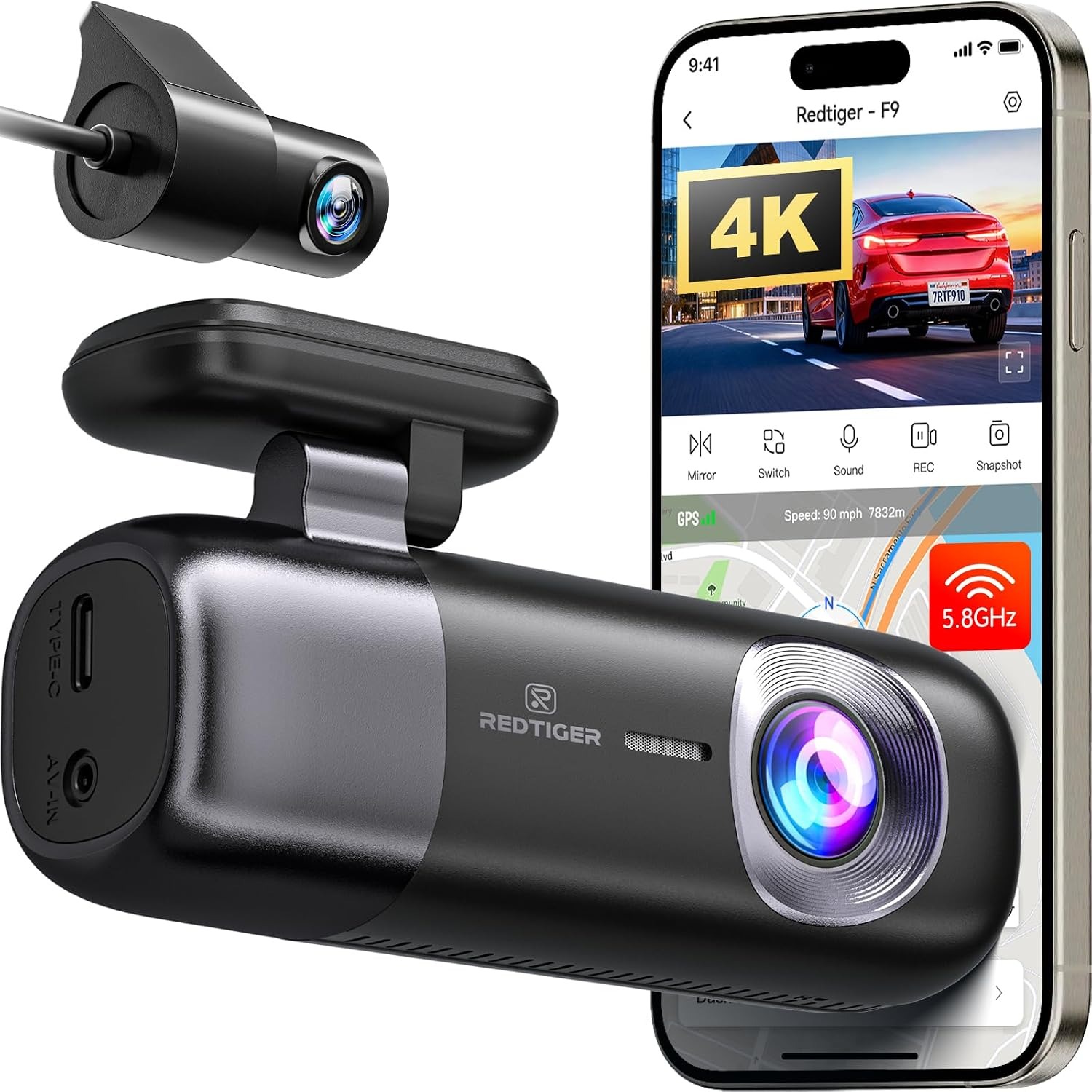
REDTIGER F9 4K Front and Rear Dash Cam with WiFi App Control

$259.99 $311.99 Save $52
  • 4K Front Recording
  • App Control
  • G-Sensor Lock
  • GPS Built In

Price: $259.99 $311.99

  • Free tracked Australia-wide delivery on orders $150+, otherwise a flat $15
  • Pay by card or PayPal, handled by the payment provider
  • 14 days to change your mind, plus your statutory rights
Product specifications
ModelREDTIGER F9
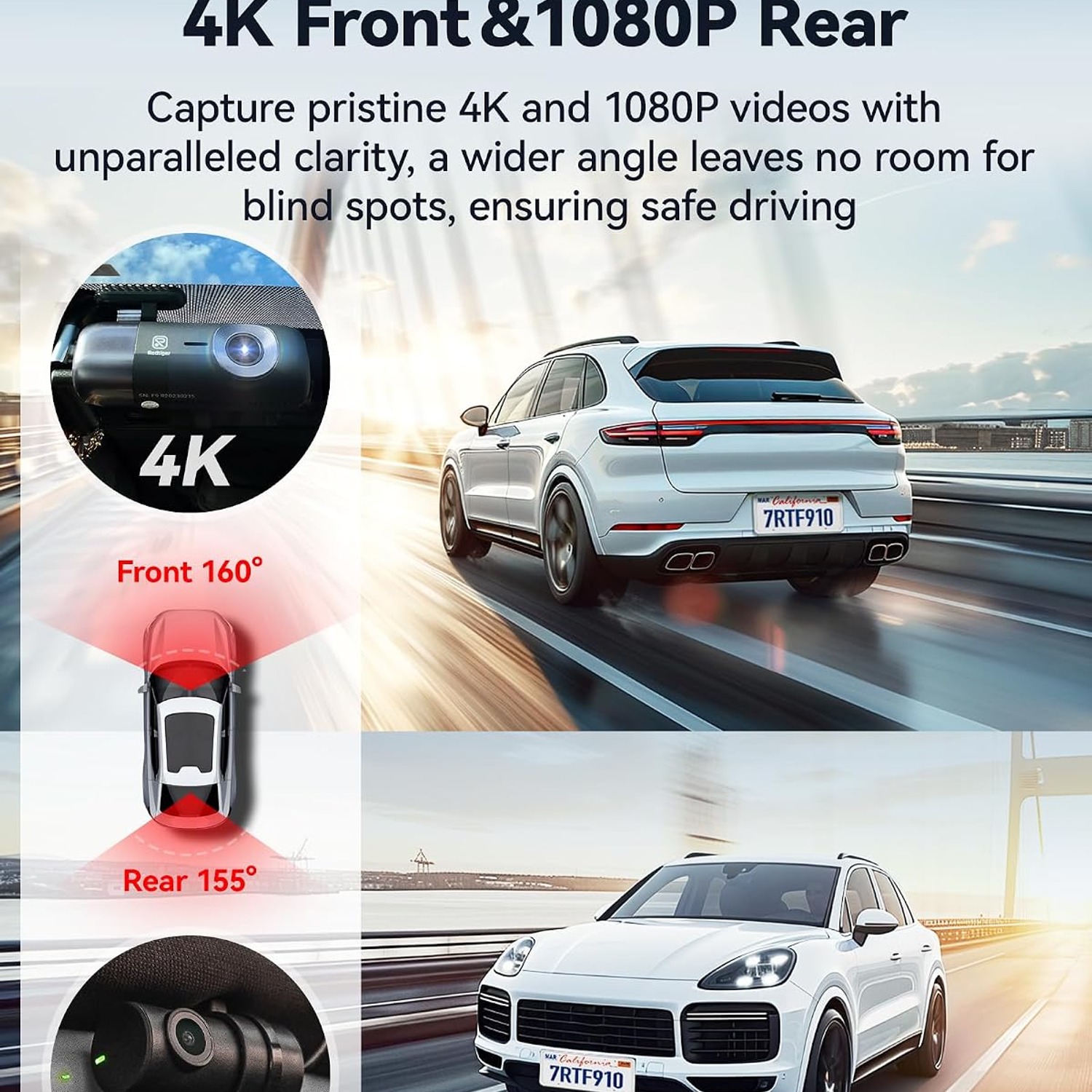
Video Resolution4K front, 1080P rear
Frame Rate30 FPS
Field of View170 degrees
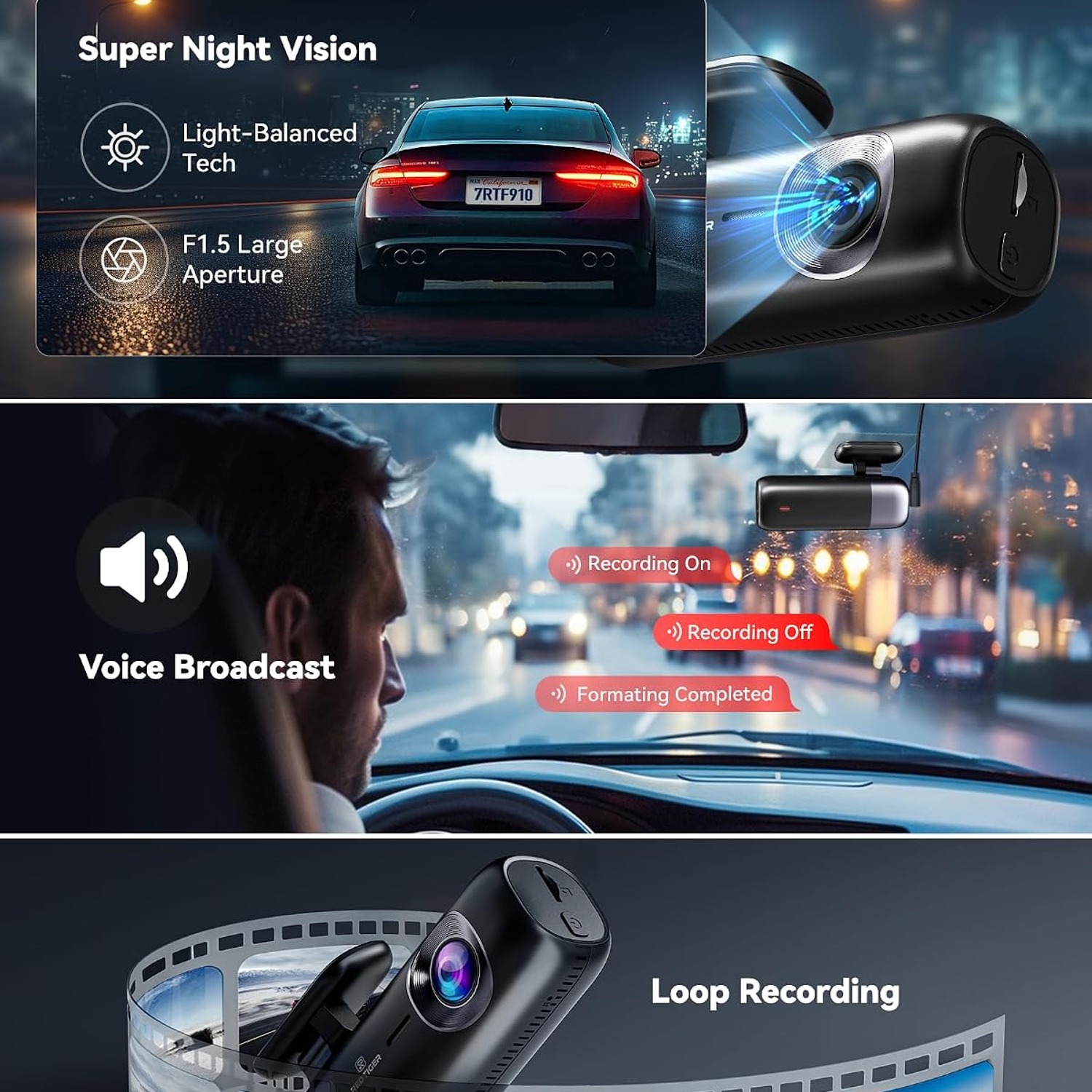
Maximum Aperturef/1.5
Screen Size3 inches
Display TypeLED
SensorCMOS
ConnectivityWi-Fi
Control MethodApp
StoragemicroSD, up to 256GB (card not included)
Mounting TypeSuction cup mount
Batteries IncludedNo
Special FeaturesBuilt-in WiFi, night vision, built-in supercapacitor, app control, loop recording, built-in GPS, G-sensor, compact design, parking mode
Compatible VehiclesCar, bus, minivan, truck
ColourBlack
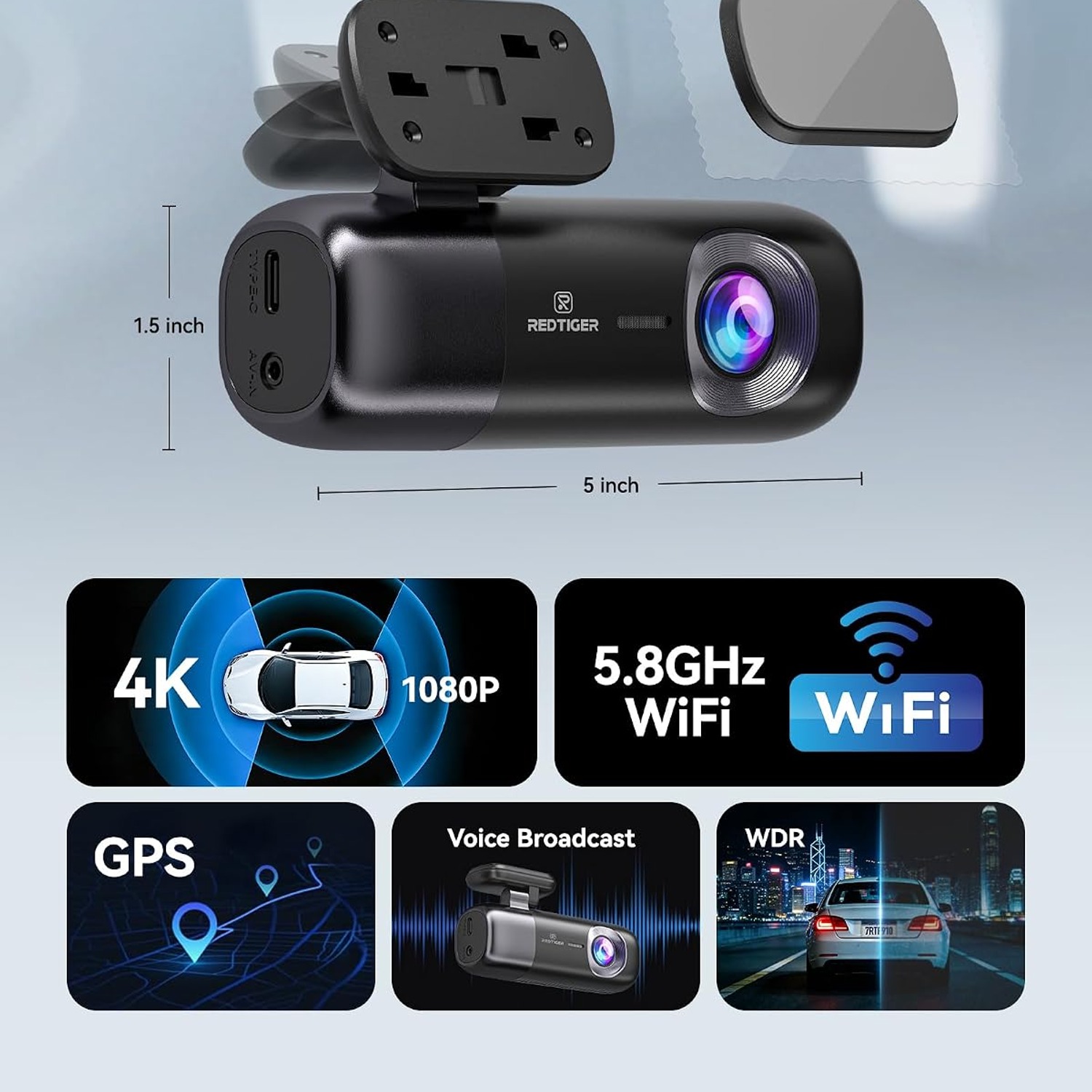
Item Dimensions5 x 7 x 6.3 cm (D x W x H)
Item Weight104 g
Weight104 g
Shipping & returns

Tracked delivery anywhere in Australia. It is free on orders of $150 or more, and a flat $15 below that.

If it is not right for you, send it back within 14 days of delivery in resaleable condition and we refund the price you paid, including standard delivery. That is a voluntary policy we offer on top of your legal rights. You cover the cost of returning it unless the item is faulty.

If it arrives faulty, damaged or not as described, we put it right at no cost to you under the Australian Consumer Law and the Competition and Consumer Act 2010, return postage included.

Shipping details · Refunds and returns

4K Front RecordingFront camera captures 4K video at 30 frames per second.
App ControlBuilt-in WiFi lets you view and download clips on your phone.
G-Sensor LockSudden impact locks the clip so it is not overwritten.
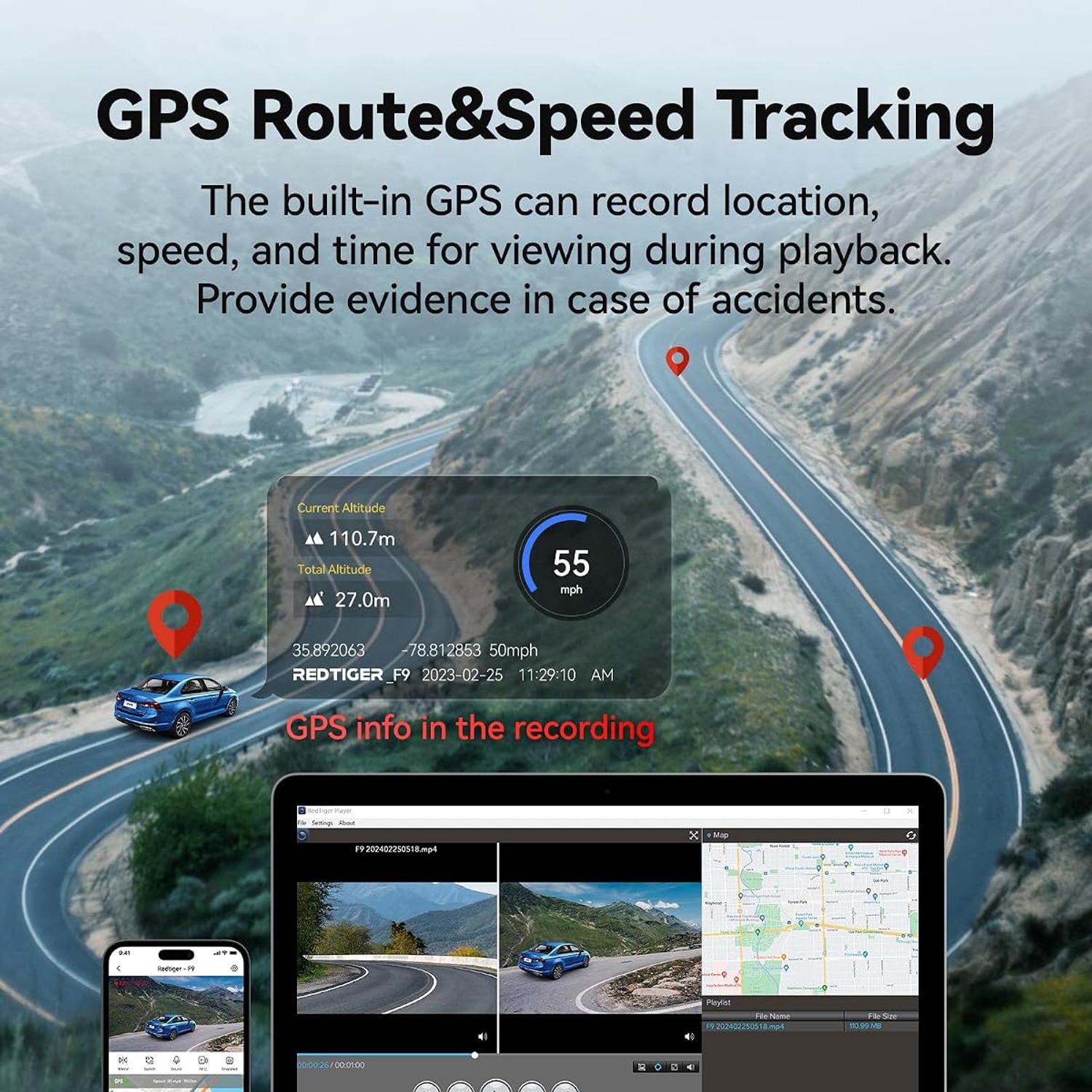
GPS Built InRecords location data alongside your footage.

Drive with a clear record of every trip behind you, thanks to a 4K front and rear dash cam that quietly watches the road while you focus on it.

Dual cameras record 4K at the front and 1080P at the back through a 170 degree wide angle lens, with WiFi app control, loop recording, GPS, a G-sensor and parking mode built in.

A 4K front and rear dash cam that records the road ahead in 4K and the view behind in 1080P.

A 170 degree field of view and an f/1.5 maximum aperture help the camera take in wide scenes and low light.

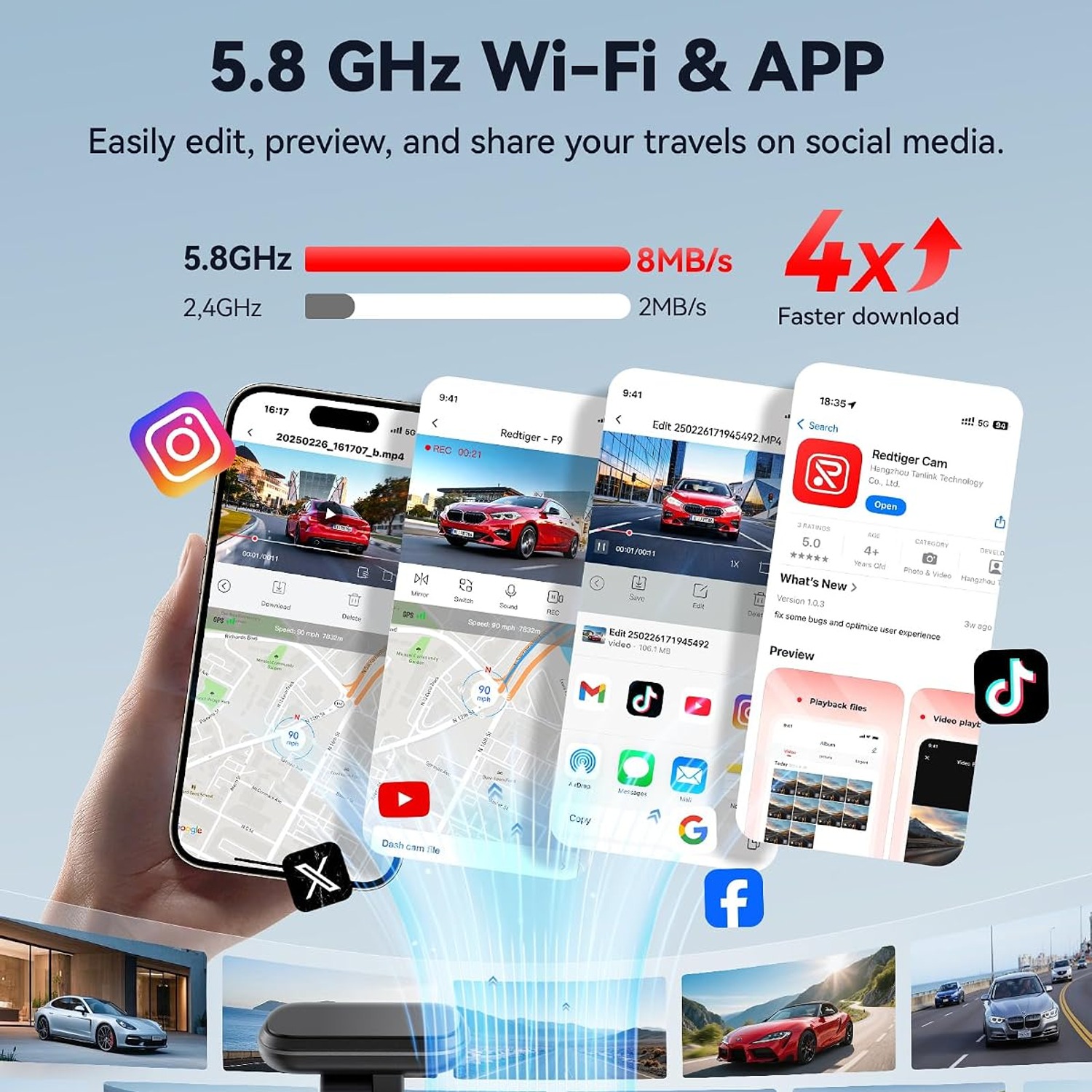
Built-in WiFi connects the camera to the REDTIGER app so you can watch, download and manage footage from your phone.

Loop recording with support for microSD cards up to 256GB keeps the camera running without you clearing files by hand.

A G-sensor, built-in GPS and parking mode add context and protection to everything it records.

REDTIGER F9 4K Front and Rear Dash Cam with WiFi App Control

Most drivers only think about a dash cam the week after something goes wrong. A near miss on a roundabout, a shopping centre car park scrape with no note left behind, a dispute at an intersection where both drivers insist they had the green light. None of those situations are improved by memory. They are improved by footage. The REDTIGER F9 is a dual camera setup built to handle exactly those moments, with 4K recording at the front and 1080P at the rear so both ends of the car have a witness.

REDTIGER F9 4K Front and Rear Dash Cam with WiFi App Control

The front camera uses a CMOS sensor behind an f/1.5 maximum aperture lens with a 170 degree field of view, recording at 30 frames per second. The wide angle matters more than most people expect. A narrow lens sees the car in front of you and little else, while a 170 degree view takes in the kerb, the adjacent lanes and the vehicle that decided to merge without looking. The large aperture lets in more light, which is the part that counts on unlit roads and in underground car parks.

REDTIGER F9 4K Front and Rear Dash Cam with WiFi App Control

Everything is managed through built-in WiFi and the REDTIGER app. You connect your phone to the camera, open the app and browse what has been recorded without pulling out the memory card or finding a laptop. Clips can be played back, saved to your phone and shared from there. For anyone who has tried to pull a file off a dash cam at the side of the road with a card reader they do not have, this is the single most useful feature on the spec sheet.

REDTIGER F9 4K Front and Rear Dash Cam with WiFi App Control

Storage is handled with loop recording on a microSD card of up to 256GB, sold separately. The camera fills the card, then starts writing over the oldest footage, so it keeps going on long drives without you having to clear anything. The G-sensor watches for sudden movement and locks the surrounding clip so it sits outside the loop and survives. Built-in GPS stamps speed and location into the files, which is useful context if a clip ever needs to explain itself to an insurer.

REDTIGER F9 4K Front and Rear Dash Cam with WiFi App Control

Physically the F9 is small, measuring roughly 5 x 7 x 6.3 cm and weighing 104 g, with a 3 inch LED screen for setup and quick playback. It mounts with a suction cup, and a low body is designed to sit close to the mirror rather than sprawl across your line of sight. A built-in supercapacitor handles the shutdown process instead of a lithium battery, which is the usual choice for cameras that live on a hot windscreen. Parking mode is supported, with a hardwire kit required to keep the camera powered while the engine is off.

Not sure yet? That is fine.

A camera has to suit the job you bought it for, and you cannot always judge that from a photograph. If it is not right for you, send it back within 14 days of delivery in resaleable condition and we refund the price you paid, including standard delivery. That is on top of your Australian Consumer Law rights if anything arrives faulty.

If it turns up faulty, damaged or not as described, that is on us. The Australian Consumer Law and the Competition and Consumer Act 2010 covers you, and we pay the return postage. Read the full detail on our refunds and returns page, or ask us anything before you order.

Frequently Asked Questions

What exactly is this product?

It is a dual channel dash cam, meaning it records from two cameras at once. The front unit records in 4K and a separate rear camera records in 1080P. Both run at 30 frames per second.

What resolution does the front camera record at?

The front camera records 4K Ultra HD at 30 frames per second. That gives you a high level of detail for reading number plates and road signs. It is the main reason people look for a 4K dash cam rather than a 1080P one.

What about the rear camera?

The rear camera records at 1080P. That is enough resolution to clearly show a vehicle behind you, its colour and its behaviour. The front camera carries the higher resolution because it covers the direction you are travelling.

How wide is the view?

The field of view is 170 degrees. That is wide enough to include the kerbs and the lanes either side of you, not just the car directly ahead. Wide coverage is what separates a useful clip from a frustrating one.

Does it work at night?

The listing includes night vision among its features, and the f/1.5 maximum aperture lets a lot of light reach the sensor. That combination is what a good dash cam for night driving relies on. Results will still depend on street lighting and your windscreen being clean.

Is a memory card included?

No, the microSD card is sold separately. The camera supports cards up to 256GB. We recommend a high endurance card made for continuous video recording rather than a standard phone card.

What size memory card should I buy?

For a dual 4K and 1080P setup, 128GB or 256GB is a sensible choice. Smaller cards work but will loop over themselves more quickly. If you often take long drives, go larger.

What is loop recording?

Loop recording means the camera writes in short segments and overwrites the oldest files once the card is full. You never have to stop and clear the card manually. Locked clips are kept out of the loop.

How does the G-sensor work?

The G-sensor detects sudden movement such as a jolt or an impact. When it triggers, the camera locks the clip around that moment so loop recording cannot overwrite it. It is the feature that quietly saves the footage you actually need.

Does it have GPS?

Yes, GPS is built in. It records location and speed data alongside the video. That extra context can matter if footage is ever reviewed by an insurer or an authority.

How do I get footage off it?

The easiest way is through the app over the camera's built-in WiFi. You connect your phone, browse the recordings and download what you want. You can also remove the microSD card and read it on a computer.

Do I need internet or mobile data to use the app?

No. The camera creates its own WiFi connection that your phone joins directly. You do not need a data plan or a nearby network for playback and downloads.

Can I change settings from my phone?

Yes. The app lets you adjust settings and control functions without pressing buttons on the camera itself. This is handy once the unit is mounted up behind the mirror where the screen is hard to reach.

Is there a screen on the camera?

Yes, there is a 3 inch LED display. It is useful for aligning the camera during setup and for quick playback. Most day to day use happens in the app.

How big is the unit?

The item measures about 5 x 7 x 6.3 cm and weighs 104 g. It is designed as a compact dash cam with a low profile body. That helps it sit near the rear view mirror without taking up much of your view.

How does it mount?

It uses a suction cup mount. Suction cups are easy to reposition and easy to remove if you move the camera between cars. Clean the glass before fitting for the best hold.

Where should I mount it on the windscreen?

Just behind or beside the rear view mirror is the usual spot. It keeps the camera high enough for a clear view and out of your eyeline. Check your local rules on windscreen obstructions before fitting.

What is parking mode?

Parking mode keeps the camera monitoring your vehicle while it is switched off. It can record impacts and time-lapse footage of what happens around the car. A hardwire kit is required because the camera needs constant power.

Why do I need a hardwire kit?

A standard cigarette lighter socket usually cuts power when the engine stops. A hardwire kit draws power from the fuse box instead, so the camera can keep working while parked. The kit is not included.

Does it have a battery?

No batteries are included and the unit uses a built-in supercapacitor instead of a lithium battery. A supercapacitor handles heat better, which matters for a device that lives on a sunny windscreen. Its job is to safely close the current file when power is cut.

Will it work in my vehicle?

It is listed as compatible with cars, buses, minivans and trucks. Any vehicle with a 12V socket or a fuse box for hardwiring should be fine. Larger vehicles may need a longer rear camera cable run.

Is this suitable for rideshare or delivery driving?

Yes. Front and rear coverage is exactly what high mileage drivers want, and the app makes retrieving a clip quick between jobs. Many people looking for the best dash cam for Uber drivers prioritise dual channel recording for this reason.

Can I use it for a fleet of vehicles?

It is well suited to that kind of use, with loop recording and GPS data on every file. Each vehicle needs its own unit and memory card. Check with your insurer about how they prefer footage to be supplied.

Will it block my view?

The low profile body is designed to tuck in near the mirror rather than sit out in the middle of the glass. Mounting position still matters, so take a moment to place it well. Sit in the driver's seat and check your sightlines before committing.

Does it record audio?

Dash cams of this type typically record in-cabin audio alongside the video, and it can usually be turned off in the settings. If you carry passengers, check your local rules on recording conversations. The app settings are the place to manage this.

How do I clean the lens?

Use a dry microfibre cloth and light pressure. Avoid household sprays and solvents, which can damage lens coatings. A smeared lens undoes the benefit of a 4K sensor faster than anything else.

Do I need to maintain the memory card?

Yes, format the card in the camera every few weeks. Continuous recording is demanding on flash memory, and regular formatting keeps the file system clean. If clips start failing to save, replace the card.

How is it delivered?

Orders are shipped to your address with tracking provided once dispatched. Delivery timing depends on your location. You will get a confirmation email with details as soon as it is on its way.

Does it make a good gift?

It does, especially for a new driver, a long distance commuter or someone who has just bought a car. It is practical rather than decorative, and it is the kind of thing people are glad to own but rarely buy for themselves. Pair it with a high endurance memory card and the gift is ready to use.

What if it is not right for me?

Get in touch with our team and we will sort it out. If the camera arrives faulty or is not what you expected, contact us with your order number and we will walk you through the return or replacement process. Keep the original packaging where you can, as it makes a return simpler.

How to Choose a 4K Front and Rear Dash Cam

6 min read Camera Company

The problem a dash cam actually solves

Car insurance disputes are rarely about who was right. They are about who can prove it. Two drivers walk away from a junction with completely different accounts of what happened, and in the absence of evidence the result often comes down to a coin toss between insurers. That costs money, time and in some cases a no-claims discount that took years to build.

A dash cam removes the argument. It is a small camera that sits on your windscreen and records continuously while you drive. If something happens, the footage exists. If nothing happens, the footage quietly overwrites itself and you never think about it again. That is the whole idea.

The other thing it covers is everything that happens when you are not in the car. Car park scrapes, door dings, someone reversing into your bumper and leaving. These are not dramatic events, but they are expensive ones, and they are the most common reason people go looking for a car camera front and rear rather than a single front unit.

Why front and rear matters

A front-only camera covers the direction you are looking. That is useful, but it misses a large share of real incidents. Rear-end collisions are one of the most common crash types on the road, and a front camera records nothing at all when someone runs into the back of you.

A dual setup records both. The REDTIGER F9 puts 4K at the front and 1080P at the rear, which is the usual and sensible split. The front camera does the heavy lifting because it covers the direction of travel, where number plates and sign detail matter most. The rear camera needs enough resolution to show a vehicle, its colour and how it was behaving, and 1080P does that.

If you only ever drive on quiet roads and park in a locked garage, a single camera might be enough. For anyone who commutes, parks on the street, or drives for work, the second channel earns its place quickly.

How the recording side works

Dash cams do not record one enormous file. They write in short segments, usually one to three minutes each, and when the memory card fills up the camera starts overwriting the oldest segments. That is loop recording, and it is why you never have to think about storage.

The F9 supports microSD cards up to 256GB, and the card is not included. Buy a high endurance card. Standard cards are built for occasional photos and short videos, not for writing continuously for hours every day, and they fail sooner than people expect. A card rated for dash cam or surveillance use costs a little more and lasts a lot longer.

The G-sensor is the part that protects important footage from the loop. It detects sudden movement, the kind that comes with a hard brake or an impact, and locks the surrounding clip so it cannot be overwritten. This is why the best dash cam with G-sensor is a phrase worth searching. Without it, your most important thirty seconds can be erased on a long drive home.

Built-in GPS adds speed and location data to the files. That context is often what makes footage persuasive rather than just interesting.

Night driving and lens quality

Resolution gets the attention, but light collection does the work after dark. A sensor can only resolve what the lens lets through, and the F9 uses an f/1.5 maximum aperture, which is a wide opening. More light reaching the sensor means less noise, better colour and a better chance of reading a plate under sodium street lights.

The 170 degree field of view is the other number worth looking at. A wide lens sees the full width of the road rather than a narrow strip ahead. Incidents that start at the edges, such as a merge, a cyclist or a car coming off a side street, get captured instead of being half out of frame.

Keep in mind that a dash cam shoots through your windscreen. A dirty or smeared screen will undo a lot of good optics, so clean the glass inside and out when you fit the camera.

Living with the app

Older dash cams made retrieving footage a chore. You pulled the card, hunted for a reader, and hoped your laptop was nearby. Built-in WiFi changed that. The F9 creates its own connection that your phone joins directly, with no internet or mobile data needed, and the REDTIGER app handles live view, playback, downloads and settings.

In practice this is the feature you will use most. Someone clips your mirror in a car park and within two minutes you have the clip saved to your phone and ready to send. Anyone comparing options for the best dash cam with app control is usually comparing exactly this experience.

It also makes the camera easier to configure. Once the unit is mounted up near the mirror, its 3 inch screen is awkward to reach. Changing settings on your phone instead is far more pleasant.

Parking mode and power

Parking mode is what lets the camera keep watching while the car is off. It can record impacts and time-lapse footage of the surroundings. The catch is power, because most 12V sockets go dead when the ignition does.

That is why a hardwire kit is required. It connects the camera to your fuse box so it draws a small, managed amount of power while parked, usually with voltage protection to stop it draining the battery flat. The kit is not included with the camera. If parking protection is the main reason you are buying, budget for one, and consider having it fitted professionally if you are not comfortable working near a fuse box.

The F9 uses a built-in supercapacitor rather than a lithium battery. Supercapacitors cope much better with the heat and cold a windscreen sees across a year. Their role is not to power long recording sessions but to safely finish writing the current file when power is cut.

Fitting it well

Mount the camera high, behind or beside the rear view mirror. That gives a clear view over the bonnet and keeps the unit out of your eyeline. The F9 is small, around 5 x 7 x 6.3 cm and 104 g, with a low profile body intended to sit close to the glass.

Clean the mounting area first with an alcohol wipe so the suction cup holds properly. Route the power cable along the headlining and down the A-pillar trim rather than letting it dangle. Tuck the rear camera cable along the same side of the car, following existing trim lines.

Before you finalise anything, sit in the driver's seat and check your view. Also check your local regulations, because rules about what can sit on a windscreen vary by region.

Keeping it working

Maintenance is light but not optional. Wipe the lens with a dry microfibre cloth when it looks hazy. Format the memory card in the camera every few weeks, since continuous writing is hard on flash memory and regular formatting keeps things tidy. If clips start failing or the camera reports card errors, replace the card rather than hoping it settles.

Every month or so, play back a recent clip. It takes thirty seconds and confirms the whole chain is working. A dash cam you assume is recording and is not is worse than no dash cam at all.

The short version

If you want a camera that covers both ends of your car, the F9 gives you 4K at the front, 1080P at the rear and a 170 degree view through an f/1.5 lens. WiFi and the app make getting footage off it genuinely easy. Loop recording, a G-sensor and GPS handle the background work without you touching anything.

Add a high endurance microSD card up to 256GB, since one is not included. Add a hardwire kit if you want parking mode. Mount it near the mirror, check it occasionally, and then forget about it until the day you need it.

Browse the shop

Ready to record both ends of the road?

Add the REDTIGER F9 to your cart and pair it with a high endurance microSD card so it is ready to run the day it arrives.

Ask us a question

Page summary

The REDTIGER F9 is a dual dash cam that records 4K video from the front camera and 1080P from the rear camera at 30 frames per second. It uses a CMOS sensor with a 170 degree field of view and an f/1.5 maximum aperture, and has a 3 inch LED screen. Built-in WiFi allows app control for live view, playback and downloads. Storage is on a microSD card up to 256GB, which is not included, with loop recording. Other features include built-in GPS, a G-sensor, night vision, a built-in supercapacitor and parking mode, which requires a hardwire kit. The unit measures 5 x 7 x 6.3 cm, weighs 104 g, is black, and uses a suction cup mount. Batteries are not included. Country of origin is not specified by the maker.